Editing a Vertical Proportion Curve (VPC)
Sedimentary rocks typically exhibit a non-stationary behavior in vertical direction caused by the cyclicity of deposition. You can derive these vertical trends from facies/lithotype interpretations of well data, or you might conceptualize them in case of limited number of wells. The Edit Vertical Proportion Curve form (opened by clicking the pencil on the Vertical, Lateral or 3D tab of the model > Facies > Trends & Proportions form) enables you to exert control on changes of facies proportions on a k-layer by k-layer basis. Additional control on the vertical distribution of facies properties helps to generate more realistic geomodels when working with techniques like SIS (Sequential Indicator Simulation), MPS (Multiple Point Statistics) and TGS (Truncated Gaussian Simulation).
The Edit Vertical Proportion Curve form
On the form, two data charts are visible, the Upscaled Proportions (left chart) and the Target Proportions for Modeling which is the modeling input (right chart), see image below.
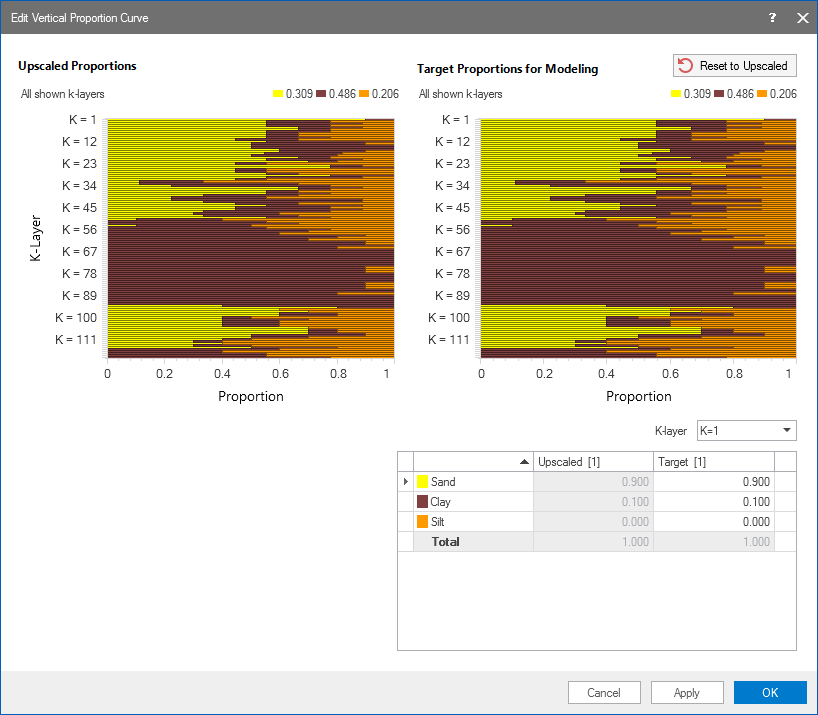
The Edit Vertical Proportions Curve form. Hover over the k-layers to get detailed information on the facies proportions. Edit the proportions with the table on the form. click to enlarge
The Upscaled Proportions (left chart) are the calculated facies proportions of the upscaled property from discrete well data whose trajectory intersects the k-layers within the zone of interest. This chart is for inspection purposes only and not editable. The proportions are based on the number of samples (i.e. grid cells) present and must add up to 100%.
The right chart (Target Proportions for Modeling) shows the proportions as they will be used as input to modeling. You can edit these proportions via the table at the bottom of the form.
Editing facies proportions in the table
The table at the bottom of the form allows you to change facies proportions per k-layer by directly entering the facies proportions in the table. The left column ('Upscaled') refers to the Upscaled Proportions chart and is not editable. The right column ('Target') refers to the Target Proportions chart and is available for editing.
To edit the proportions:
- First select the relevant k-layer from the drop-down list above the table.
- Type your preferred facies proportions in the table (after typing the last value, press tab on your keyboard to end entering mode).
You can always retrieve the initial (upscaled) proportions by clicking the  Reset to Upscaled button at the top of the chart; this will reset your edits.
When you are finished editing the facies proportions, click Apply to save the edits and keep the form open, or click OK to save the edits and exit the form.